YouTube Thumbnail Extractor And Downloader
Extract and download YouTube thumbnails in HD and multiple resolutions. Paste any YouTube video or Shorts link to get the high-quality thumbnail instantly.
Extraction Error
Example Result
Sample
Thumbnail Extracted
Rick Astley - Never Gonna Give You Up (Official Video) (4K Remaster)
All Available Sizes
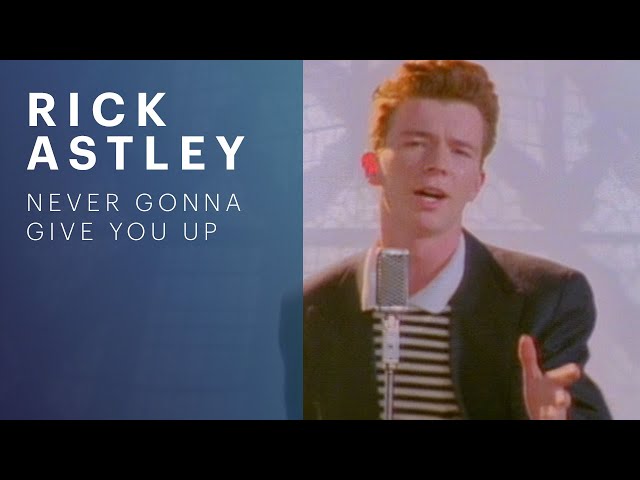


Thumbnail Extracted
YouTube Thumbnail Sizes and Resolutions
YouTube stores several thumbnail sizes for each video. Here's what each size means, what it's called, and when to use it. Not every video has the largest size.
Max Resolution (1280×720)
1280 x 720 pxThe largest thumbnail YouTube stores for a video — the image originally uploaded by the creator. Use it for presentations, blog posts, or anywhere image quality matters. Not every video has this size; when it's missing, the tool uses the next largest available.
480p Standard Quality
640 x 480 pxA good balance between quality and file size. Suitable for social media posts, email newsletters, and general web usage where moderate quality is acceptable.
360p Medium Quality
320 x 180 pxA smaller file size option. Useful for preview thumbnails, playlist grids, and situations where loading speed is prioritized over image quality.
120p Default Thumbnail
120 x 90 pxThe smallest thumbnail size. Used for favicons, browser tabs, and compact list views. Not recommended for display purposes where visibility matters.
Resolution is only half the click decision. For design rules that lift click-through rate, see vidIQ's thumbnail design best practices.
Download a Thumbnail in 3 Quick Steps
-
1. Paste URL
Enter any YouTube video or Shorts link into the box above.
-
2. Fetch Thumbnails
The server calls the official API and returns all available thumbnail sizes.
-
3. Download Image
One-click download saves the HD thumbnail to your device.
How YouTube Thumbnails Work
Every public video and Short has a thumbnail that YouTube stores on its image servers. The extractor reads the sizes YouTube provides for that video — it doesn't resize, recreate, or generate a new image.
YouTube Image CDN URL Structure
https://img.youtube.com/vi/VIDEO_ID/maxresdefault.jpg
Resolution Values
-
maxresdefault— 1280×720 (max resolution) -
sddefault— 480p SD -
hqdefault— High Quality -
mqdefault— Medium Quality -
default— 120p Default
Image Format
- Format: JPEG (.jpg)
- Color Space: sRGB
- Aspect Ratio: 16:9
- Compression: Lossy
- CDN: YouTube Image Servers
Example URLs
Note: Not all videos have maxresdefault thumbnails available. If a video doesn't have an HD thumbnail, the tool will fallback to the highest available resolution.
Shorts use the same thumbnail source as standard videos, so a youtube.com/shorts/ link returns the same images. The link always points to YouTube's original stored file — what you download is the source image, not a resized or AI-altered copy.
Thumbnail Upscaler
Increase the resolution of your extracted thumbnail by resampling it to a larger size. The original image is used automatically — no uploads needed.
Original Thumbnail
Choose Scale Factor
8× is disabled to avoid exceeding browser memory limits. Supports up to 4×.
Extract a thumbnail above to enable upscaling.
Upscaling thumbnail...
Generating a higher-resolution image
Upscaling failed
Supported Videos, Shorts & Limitations
The tool reads publicly available thumbnail images. A few cases aren't reachable, and not every video has the largest size.
What works
- Public YouTube videos (youtube.com/watch?v=…, youtu.be/…, /embed/, /live/)
- YouTube Shorts — they use the same thumbnail source as regular videos
- A raw 11-character video ID pasted directly
- Any size YouTube actually provides for that video, from 120×90 up to 1280×720
Not available
- Private videos — they aren't readable through the public source
- Deleted or removed videos — nothing can be retrieved
- Login-only or region-blocked videos
- A guaranteed higher-resolution image — the largest source size is 1280×720, and some videos only have smaller sizes
When a video doesn't have the largest thumbnail, the tool shows the next highest size that exists rather than inventing a higher resolution.
Who Uses YouTube Thumbnail Extraction
People who work with YouTube content use extracted thumbnails as references, archives, and creative benchmarks — here are the workflows that come up most.
YouTuber
Review or save thumbnails from published videos for reference, organization, or content planning.
Content Creator
Collect thumbnail references while planning the visual direction for future content.
Video Editor
Keep thumbnail assets available alongside video projects as a visual reference.
Graphic Designer
Review existing YouTube thumbnails when preparing or comparing visual concepts.
Digital Marketer
Review thumbnails used across videos when evaluating content presentation and promotion.
SEO Specialist
Review thumbnail presentation alongside video titles and metadata during YouTube content analysis.
Frequently Asked Questions
It's a tool that retrieves the existing thumbnail YouTube stores for a public video or Short, then shows the available image resolutions so you can preview or download them. It does not create or generate a new thumbnail.
Paste the video URL into the box above and submit. The tool reads the available thumbnail images for that video and displays them so you can preview and download each size.
Yes. Shorts use the same thumbnail source as regular videos, so pasting a youtube.com/shorts/ link works the same way.
YouTube stores several sizes: 120×90, 320×180, 640×480, and 1280×720. The tool shows whichever of these the video actually has.
The largest source size YouTube provides is 1280×720. When a video has that size, you can download it as the HD version. Not every video has it, in which case the tool uses the next highest available size.
The largest thumbnail depends on what was uploaded and how YouTube processed the video. Some videos only have smaller sizes available, so the tool falls back to the highest one that exists.
No. Private, deleted, or login-only videos can't be read through the public source, and the tool shows a clear message instead of returning an image.
Yes. Each thumbnail size has a Copy URL action that puts the direct image link on your clipboard.
If the video can't be found or isn't publicly accessible, the tool returns a clear message and no thumbnail is shown.
Download YouTube Thumbnails Free
Get the thumbnail in every resolution YouTube provides. No login, no limits, no cost.